



How to Use Super Cruise: Complete Owner’s Guide for GMC & Buick
Super Cruise is the most capable hands-free highway driving system available on any production vehicle sold through a mainstream brand, and it is available on multiple GMC and Buick vehicles through Starling Buick GMC Stuart. It is also the technology that generates the most questions after delivery, not because it is difficult to use, but because hands-free driving is new enough that most owners have never used any system like it, and the gap between what they have read and what the experience actually involves produces questions that a proper owner orientation resolves quickly.
This guide covers everything about Super Cruise from the owner’s perspective: what it does and does not do, which specific GMC and Buick vehicles have it in 2026 and 2027, the step-by-step activation sequence, the roads where it operates, the light bar communication system, the subscription it requires, and the specific troubleshooting steps for the most common operational questions. If you have already purchased a Super Cruise-equipped vehicle and want to understand it fully, this is the guide. If you are evaluating a vehicle purchase and want to understand the technology before the test drive, this is also the guide.
What Super Cruise Actually Does (And Doesn’t Do)
Super Cruise is a Level 2 driver assistance system that enables fully hands-free operation on compatible divided highways. ‘Hands-free’ is literal: when Super Cruise is active, your hands can be in your lap, on the armrest, or anywhere off the steering wheel while the system steers, accelerates, and brakes to maintain your lane position and following distance from the vehicle ahead. The system monitors your eyes rather than your hands to confirm driver engagement, a design choice that enables genuine hands-off operation while maintaining the driver attention requirement that current safety standards and regulations require.
What Super Cruise does: maintains your lane, maintains a set following distance from the vehicle ahead, brakes for slower traffic, accelerates back to your set speed when traffic clears, executes hands-free lane changes on compatible roads when the driver activates the turn signal, and monitors whether your eyes are directed toward the road ahead through an infrared camera mounted near the instrument cluster. What Super Cruise does not do: it is not self-driving, it does not handle exits from the highway, it does not operate in construction zones with altered lane configurations, it does not replace driver judgment or legal responsibility, and it does not operate on city streets, at intersections, or on roads not in its pre-mapped compatible network.
Super Cruise vs Standard Adaptive Cruise Control
Standard Adaptive Cruise Control (ACC), which is available on virtually every current GMC and Buick vehicle regardless of whether Super Cruise is equipped, manages longitudinal control only: it maintains a set following distance from the vehicle ahead and brakes automatically for slower traffic. It does not steer. The driver must keep hands on the wheel at all times and is responsible for all lateral (steering) control. Super Cruise adds lateral control, the system steers to maintain the lane, while also extending the hands-off requirement removal that ACC already implies for longitudinal control.
The result: with ACC, you manage the wheel while the system manages speed and distance. With Super Cruise on a compatible road, you manage nothing for as long as the system’s conditions are met and your eyes are forward. The two systems use different sensor architectures: ACC uses radar and cameras for forward sensing; Super Cruise adds the HD LiDAR map, GPS, and the driver attention camera that makes the hands-free operation possible.
Super Cruise vs Tesla Autopilot: The Key Difference
The distinction between Super Cruise and Tesla’s Autopilot and Full Self-Driving (FSD) systems is architecturally significant and affects real-world performance in specific ways. Super Cruise uses pre-mapped LiDAR road data, a high-definition map of every compatible road segment in its network, built by GM’s survey vehicles before the feature is ever offered on a consumer vehicle, to define the lane and road geometry that the system follows. This mapped-road architecture makes Super Cruise exceptionally consistent and reliable on the roads it covers; the system knows precisely where the lane lines are, where the curves are, and what the road geometry ahead looks like regardless of whether the camera can see lane markings at that specific moment. Tesla’s FSD uses a camera-based neural network approach without pre-mapped road data, which allows it to operate on a broader range of roads including city streets, intersections, and traffic signals that Super Cruise does not handle.
The trade-off is behavioral consistency: Super Cruise’s performance on compatible highways is extremely predictable because it is operating on a known map; FSD’s performance is more variable because it is making real-time inferences from camera data rather than following a known map. The other key difference: Super Cruise monitors driver attention through an infrared camera rather than requiring periodic steering wheel contact. This is what makes Super Cruise genuinely hands-free, Tesla’s hands-free implementation requires periodic touch confirmation that Super Cruise does not.
Which GMC and Buick Models Have Super Cruise
Super Cruise availability in the GMC and Buick lineup is concentrated at premium trim levels, with the exception of the GMC Sierra EV and Hummer EV where it appears at broader trim accessibility. The list below reflects the 2026 and 2027 model year availability as of August 2026.
GMC Models: Sierra Denali, Yukon Denali, Hummer EV, Sierra EV
- Sierra 1500: available on Denali and standard on Denali Ultimate. Not available on Pro, SLE, Elevation, SLT, AT4, or AT4X.
- Sierra 2500HD and 3500HD: available on Denali and standard on Denali Ultimate, following the same pattern as the Sierra 1500.
- Sierra EV: available on Elevation, standard on AT4 and Denali, the broadest Super Cruise availability across any single Sierra lineup, reflecting the Sierra EV’s positioning as a technology-forward vehicle where the feature is offered at a lower entry trim threshold than the gasoline Sierra.
- Yukon and Yukon XL: available on Elevation (new for 2026, previously restricted to higher trims), AT4, and Denali; standard on AT4 Ultimate and Denali Ultimate. The 2026 Yukon is the first year Super Cruise is available on the Elevation trim, significantly expanding access within the Yukon lineup.
- Canyon: available on AT4 and Denali, making the Canyon the only mid-size truck from any manufacturer to offer hands-free driving at any price.
- Hummer EV Pickup: available upgrade on 2X and 3X trims.
- Hummer EV SUV: standard on all trims.
- Acadia: available on Denali and standard on Denali Ultimate.
Buick Models: Enclave Avenir (Standard for 2027), Envision
- Enclave: Super Cruise is NOT available on the 2026 Buick Enclave at any trim level. For 2027, this changes: GM Authority confirmed in July 2026 that the Super Cruise Package (RPO code WQ1) becomes standard equipment on the 2027 Buick Enclave Avenir, the first time Super Cruise is offered on any Buick Enclave. The 2027 Avenir’s base price increased by $3,300 to reflect this standardization. Super Cruise remains available as an option (not standard) on the 2027 Enclave Preferred and Sport Touring trims.
- Envision: Super Cruise is available on the Buick Envision as an option on upper trims, the Envision is one of 19 GM models to offer Super Cruise with hands-free trailering per GM Authority’s July 2026 coverage.
Buyers considering a Buick Enclave Avenir for its Super Cruise capability should note that the 2027 model is now orderable and delivers the feature as standard rather than requiring option selection.
How to Check If Your Specific Vehicle Has It
- The most reliable method: look at the steering wheel. Super Cruise-equipped vehicles have a dedicated Super Cruise button on the steering wheel, a small button with the Super Cruise logo (a steering wheel with hands off) on the left steering wheel spoke. If this button is present, the vehicle is Super Cruise equipped. If it is absent, the vehicle does not have Super Cruise regardless of what the window sticker or any other documentation says.
- The second method: check the instrument cluster for the Super Cruise icon (a road with the Super Cruise symbol) when the vehicle is on, it will appear in the driver display if the feature is active and the vehicle is on a compatible road with all conditions met.
- The third method: our sales team at Starling Buick GMC Stuart can run the VIN and confirm Super Cruise equipment status on any vehicle in current or historical inventory.
- For buyers evaluating a used vehicle: do not assume Super Cruise is present based on trim level alone, verify the specific VIN’s equipment list, as some vehicles in lower allocation periods were ordered without the Super Cruise Package even at Denali trim.
How to Activate Super Cruise (Step-by-Step)
Super Cruise activation is a three-step sequence that becomes intuitive after the first few uses. The system is designed to be unambiguous: each state has a clear visual indicator, and the transition between states is clearly communicated. The confusion that new Super Cruise users experience is almost always about understanding what each light bar color means, addressed in the following section, rather than about the activation sequence itself.
The 3 Conditions Required Before It Will Engage
Super Cruise will only activate when three conditions are simultaneously met. First, the vehicle must be on a Super Cruise-compatible road segment, a pre-mapped divided highway in the compatible road network. GPS continuously tracks the vehicle’s position against the map database; when the vehicle enters a compatible segment, the system recognizes it and becomes available. If you are driving and the system is not available despite ACC being active, the most common reason is that the road is not in the compatible network. Second, Adaptive Cruise Control must already be active and set to a target speed. Super Cruise operates as an extension of ACC, not independently, ACC must be turned on and speed must be set before Super Cruise can be engaged. Third, the driver attention camera must acquire the driver’s face and confirm eyes-forward attention. The infrared camera system calibrates to the driver’s face quickly, typically within 30 seconds of the driver settling into a normal forward-facing position. If the camera cannot acquire the driver’s face due to direct sunlight angle, highly reflective eyewear, or position, the system will indicate this and Super Cruise will not engage until the camera condition is resolved.
The Button Sequence to Turn It On
With all three conditions met, the Super Cruise button on the steering wheel is the single action that activates the system. The sequence in detail:
- Step 1, Ensure you are on a divided highway in the compatible network and the vehicle is in a traffic situation appropriate for ACC use.
- Step 2, Activate Adaptive Cruise Control by pressing the ACC button on the steering column and setting your desired speed and following distance.
- Step 3, Watch for the white Super Cruise steering wheel icon to appear on the instrument cluster. White means ‘Super Cruise is ready and available’, all three conditions are met and the system is waiting for the driver to engage it.
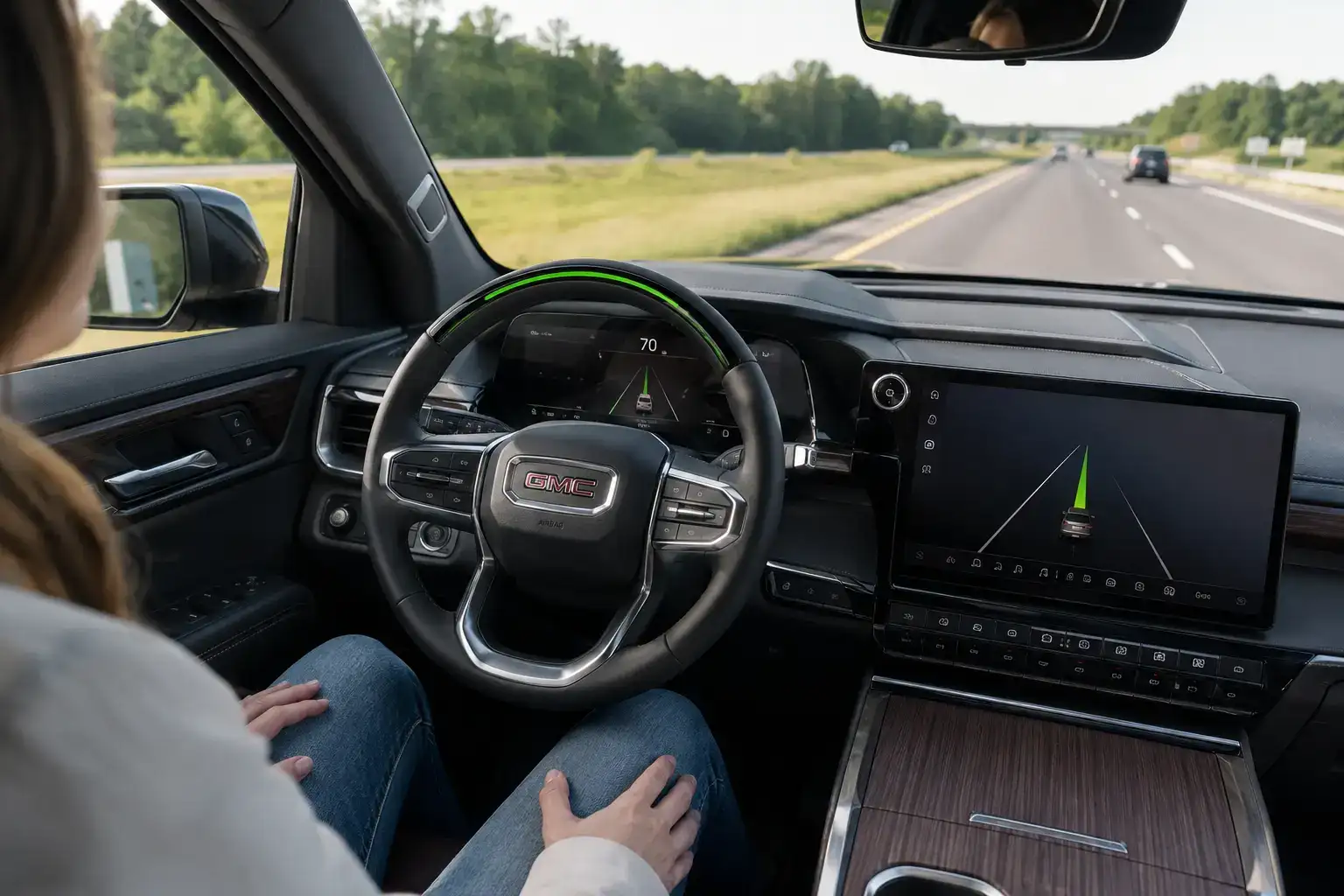
- Step 4, Press the Super Cruise button on the steering wheel once. The instrument cluster icon turns green and the steering wheel light bar turns green. Green means ‘Super Cruise is active and hands-free operation is confirmed.’ Your hands can now leave the steering wheel. The system is managing steering, speed, and following distance while the driver attention camera monitors eyes-forward attention.
Where Super Cruise Works (Compatible Roads)
Super Cruise’s compatible road network is built on GM’s proprietary High-Definition LiDAR map database, a network of pre-surveyed divided highways where the road geometry has been mapped at centimeter-level precision before the feature is offered to consumers. This pre-mapping approach is the foundation of Super Cruise’s consistency and reliability on the roads it covers.
400,000+ Miles of Mapped Roads Explained
GM launched Super Cruise on the 2018 Cadillac CT6 with a compatible road network of roughly 200,000 miles of divided highways across the United States and Canada. Since then, the system’s mapped road network has grown continuously through over‑the‑air (OTA) map updates.
Today, Super Cruise supports well over 400,000 miles of compatible roads in the U.S. and Canada, with the network now extending into the 600,000–750,000+ mile range as GM keeps adding new segments. This expansion includes not only the original interstate highways, but also many additional U.S. and Canadian highways and selected non‑divided roads where the system has been validated for hands‑free driving.
New road segments are added as GM’s LiDAR survey program maps them, validates them, and integrates them into Super Cruise’s compatible network. These updates are delivered automatically to eligible Super Cruise‑equipped vehicles via OTA updates, so the vehicle’s compatible road network expands without any action required by the owner.
Super Cruise‑equipped vehicles that are eligible for network expansions continue to receive all future map additions through OTA updates for as long as the vehicle remains supported and the required OnStar/subscription plan that enables Super Cruise stays active.
Florida Highways Where Super Cruise Is Available
For Stuart and Treasure Coast GMC and Buick owners, the locally relevant Super Cruise-compatible roads are I-95 and Florida’s Turnpike. I-95 is compatible along its full Florida length from Miami to Jacksonville, a 362-mile stretch that covers the complete Treasure Coast corridor, passing through or near Stuart, Fort Pierce, Vero Beach, Sebastian, Melbourne, and points north. The Stuart area’s I-95 segment is compatible for hands-free driving in both directions. The Florida Turnpike is compatible along its Florida Turnpike Mainline length, covering the route from Homestead northward through the Fort Lauderdale-West Palm Beach corridor and continuing north. For buyers who commute between Stuart and Palm Beach County on the Turnpike, or who make regular I-95 runs between the Treasure Coast and Jacksonville, Miami, or Orlando, Super Cruise’s compatible road coverage is operational on the specific routes they drive most frequently. Check the Super Cruise-compatible road map at supercruise.com to verify any specific road segment.
Understanding the Light Bar and Steering Wheel Colors
The light bar, a thin strip of LED illumination on the upper surface of the steering column behind the steering wheel, is Super Cruise’s primary status communication to the driver. Understanding what each color means, and responding correctly to each color, is the most important practical knowledge for Super Cruise operation.
Green Light Bar: Hands-Free Active
Green is the system’s operating state. When the light bar is steady green and the instrument cluster shows the green Super Cruise icon, the system is actively managing steering, speed, and following distance and the driver attention camera has confirmed eyes-forward attention. In green mode, the driver’s hands can be off the steering wheel indefinitely, there is no time limit or periodic return-to-wheel requirement in green mode as long as driver attention monitoring continues to confirm eyes-forward attention. If the driver’s gaze wanders from the forward direction, looking at a phone, looking at a passenger for an extended period, or closing their eyes, the system will begin the alert progression toward requesting driver re-engagement. Maintaining eyes-forward attention is the single responsibility in green mode.
Blue Light Bar: Automatic Lane Change in Progress
Blue indicates that the Lane Change on Demand feature is in progress, the system is executing an automatic lane change that the driver initiated by activating the turn signal while Super Cruise was active in green mode. During blue mode, the system is actively steering the vehicle across the lane boundary into the adjacent lane while confirming the target lane is clear and safe for the maneuver. The driver’s hands should remain off the wheel during a Lane Change on Demand execution to avoid interfering with the system’s steering inputs. Once the lane change is complete and the vehicle is centered in the new lane, the light bar returns to green. Lane Change on Demand is available on compatible roads with compatible lane configurations, the system will not initiate a lane change into a lane it cannot confirm is clear.
Red Light Bar: Take Over Immediately
Red is the urgent state. A steady or flashing red light bar means the system needs driver re-engagement immediately and is escalating its alert to the maximum priority level. Red is preceded by a blue request-to-take-over state, the system always provides a progressive alert sequence that begins with a gentle request and escalates to the red urgent request if the driver does not respond. Red mode is reached when: the vehicle is approaching a road segment that exits the compatible network (an offramp or transition to a non-mapped road); the driver attention camera has failed to confirm eyes-forward attention despite prior alerts; weather or road conditions have caused the system to determine it cannot maintain reliable operation; or any system fault has occurred. Respond to a red light bar by placing hands on the wheel and resuming control. If the driver does not respond to the red alert, the system will gradually decelerate the vehicle to a safe stop while continuing to maintain its lane, a designed-safe default for the scenario where a driver has become incapacitated.
Common Reasons Super Cruise Disengages
Super Cruise disengages more frequently in certain driving conditions and with certain driver behaviors than in others. Understanding the common disengagement triggers helps owners anticipate them and manage their driving accordingly rather than experiencing repeated unexpected disengagements that interrupt the hands-free experience.
Driver Attention System Warnings
The driver attention camera is the most common source of Super Cruise disengagements for new users. The infrared camera monitors the driver’s eye direction, eyelid state, and head position continuously. The most common attention-related disengagement triggers: looking at the infotainment screen for more than a brief glance; looking at a phone or object in the lap for several seconds; looking at a passenger in an extended conversation where the driver’s gaze is consistently directed sideways; closing eyes or microsleeping; and wearing sunglasses with mirror lenses or frames that interfere with the camera’s infrared sensing. The camera’s attention threshold is calibrated to be permissive for brief normal eye movements, glancing at a mirror, looking at a gauge, adjusting the climate control, while triggering alerts for the sustained attention withdrawal that represents a meaningful safety concern. New Super Cruise users often find the system more sensitive than they expected; experienced users develop the natural forward-gaze habit that allows extended hands-free operation without disengagement.
Road Conditions and Weather Limits
Super Cruise disengages automatically when conditions exceed its operational parameters. Rain: light to moderate rain does not typically cause disengagement; heavy rain that significantly reduces camera visibility or creates hydroplaning conditions causes automatic disengagement. Florida’s afternoon thunderstorms, which can go from dry to heavy rain in minutes, create the most common weather-related disengagement for Treasure Coast Super Cruise users. This is appropriate behavior: the system recognizes that heavy rain conditions warrant driver attention and hands-on control. Fog: heavy fog that significantly reduces forward visibility causes disengagement. Night driving: Super Cruise operates normally at night on compatible roads; the driver attention camera’s infrared operation is not affected by low ambient light. Construction zones: active construction zones with altered lane configurations cause disengagement because the physical lane layout no longer matches the LiDAR map data the system relies on. When approaching a known construction zone on a compatible highway, the system will provide advance notice to take control.
Super Cruise Subscription and Trial Period Explained
Super Cruise requires an active OnStar subscription that includes access to the Super Cruise feature. This subscription requirement is the aspect of Super Cruise that buyers most consistently overlook in the purchase process and most consistently have questions about during the first year of ownership.
Every new GMC or Buick vehicle equipped with Super Cruise includes a complimentary 3-year OnStar trial that provides full Super Cruise functionality, compatible road access, all features, and over-the-air map updates, at no additional cost during the trial period. The trial begins at first use of the OnStar system, not at the vehicle’s delivery date. To maximize the trial period, activate OnStar at delivery and use the Super Cruise feature actively during the trial. After the 3-year trial expires, Super Cruise requires an ongoing subscription through GM’s OnStar plans. Current OnStar plan pricing for Super Cruise access is available on OnStar.com and through our sales and finance team at Starling Buick GMC Stuart. The Super Cruise feature is not available without an active subscription, even on vehicles where the hardware is fully installed, the subscription is the enabling mechanism that activates the feature through OnStar’s connected services architecture. For buyers who plan to own their Super Cruise-equipped GMC or Buick long-term, factoring the ongoing subscription cost into the total ownership calculation is appropriate.
Common Super Cruise Problems and How to Fix Them
The troubleshooting steps below address the Super Cruise issues that owners most frequently report during the first year of ownership. Most of the commonly reported ‘problems’ are operational misunderstandings that resolve quickly once the underlying behavior is understood correctly.
Super Cruise Won’t Engage
The most common reason Super Cruise will not engage when the driver presses the button: the vehicle is not on a compatible road. GPS tracks the vehicle’s position against the compatible road map continuously; if the vehicle is on a highway segment that is not in the mapped network, the Super Cruise button will not activate the system regardless of how many times it is pressed. Check the instrument cluster, the white Super Cruise available icon only appears when the vehicle is on a compatible segment. If the icon is not present and you believe you are on a compatible road: the GPS may be recalibrating its position after a recent map update, or the specific road segment may not yet be in the network. Wait 60 seconds and check again. If ACC is not active: Super Cruise requires ACC to be running first. Activate ACC, set your speed, and wait for the white icon. If the driver attention camera has not acquired the driver’s face: ensure you are looking forward comfortably, remove highly reflective sunglasses if worn, and adjust the sun visor if direct sunlight is hitting your face from the forward direction.
Camera or Sensor Needs Cleaning
The driver attention camera is positioned near the instrument cluster and is directly exposed to the cabin environment. In Florida’s climate, the combination of air conditioning condensation, dust, and the spray from defrosters can deposit on the camera lens and reduce its ability to acquire the driver’s face. If Super Cruise is disengaging more frequently than usual and the instrument cluster shows a camera-related warning, a gentle cleaning of the camera lens area with a microfiber cloth typically resolves the issue. For forward-facing cameras and sensors that support Super Cruise’s environmental sensing: road debris, bug splatter, and mud from Florida’s rainy season roads can partially obscure the camera and radar sensors on the vehicle’s front fascia. Our service department’s multi-point inspection checks sensor cleanliness as part of routine service.
Map Update Required
Super Cruise’s compatible road network updates are delivered over the air when the vehicle has an active OnStar connection and WiFi is available. If the vehicle has been consistently parked in a location without WiFi availability, map updates may be pending. Check the myGMC or myBuick app for pending vehicle updates, or park the vehicle with the ignition on in a WiFi-connected location for 30 minutes to allow pending updates to download and install. A pending map update does not disable Super Cruise on roads that were previously compatible, it only prevents access to newly added road segments. Our service department can also apply available software and map updates during any service visit.
Frequently Asked Questions
These are the Super Cruise questions most frequently asked at Starling Buick GMC Stuart by owners and prospective buyers.
Is Super Cruise fully self-driving?
No. Super Cruise is a Level 2 driver assistance system, the same category as advanced adaptive cruise control and lane centering, enhanced to enable hands-free operation on compatible roads. The driver remains legally responsible for the vehicle at all times and must maintain eyes-forward attention. Super Cruise is not autonomous driving, does not handle all road types, and requires driver re-engagement in multiple scenarios. It is the most capable hands-free system available on a production consumer vehicle in the mainstream market, but it is not self-driving.
Can you use Super Cruise in Florida?
Yes. I-95 through Florida and the Florida Turnpike are both in the Super Cruise compatible road network, including the sections through and near Stuart. For a driver with a Super Cruise-equipped vehicle heading northbound on I-95 from Stuart toward Fort Pierce or south toward Palm Beach, the system can be engaged immediately upon entering I-95 and maintained for the entire I-95 stretch within Florida’s compatible network.
How much does Super Cruise cost after the trial?
The 3-year complimentary trial covers the full Super Cruise experience at no additional cost. After the trial, Super Cruise requires an OnStar plan that includes the Super Cruise feature. Current pricing for OnStar plans with Super Cruise access is available at OnStar.com and through our team at Starling Buick GMC Stuart. Pricing is subject to change; our team can provide current plan options at the time of your purchase or subscription renewal.
Do I need OnStar for Super Cruise to work?
Yes. An active OnStar plan that includes Super Cruise access is required for the feature to operate. The Super Cruise hardware is installed in the vehicle, but the feature is enabled through OnStar’s connected services architecture. Without an active subscription, the Super Cruise button will not activate the system even on a vehicle where the full hardware package is present.
Can you use Super Cruise while towing?
Yes, this is one of Super Cruise’s most unique capabilities in the hands-free driving category. Super Cruise is compatible with towing on compatible roads when a supported trailer is connected. GMC describes the Enclave, Sierra, Yukon, and other Super Cruise-equipped models as offering hands-free trailering capability. This means a Sierra Denali owner towing a boat trailer on I-95 between Stuart and Jacksonville can use Super Cruise on the compatible road segments of that trip while the trailer is connected, a capability that Ford BlueCruise and Tesla Autopilot/FSD do not offer. The trailer connection is detected through the trailer wiring harness; Super Cruise confirms the trailer type is supported before allowing engagement. Not all trailer types and weights are compatible; consult the vehicle’s owner’s manual for the specific trailer weight and type limitations for Super Cruise towing operation.
Experience Super Cruise in Person at Starling Buick GMC Stuart
The most effective Super Cruise orientation is a demonstration on a compatible road, not a description of how the light bar turns green. At Starling Buick GMC Stuart, our sales team offers Super Cruise demonstrations on test drives that include I-95 access from our location at 2445 SE Federal Hwy, where we can activate the system on a compatible segment and allow prospective buyers to experience the hands-free green light bar state firsthand. No purchase commitment is required for this demonstration.
For buyers who have recently purchased a Super Cruise-equipped vehicle and want a post-delivery orientation, walking through the activation sequence, understanding the light bar colors, setting up the OnStar trial, and getting questions answered by someone who knows the system: our team offers delivery orientations and follow-up consultations at no charge for customers who purchased through us. Contact our sales team at 2445 SE Federal Hwy in Stuart to schedule your Super Cruise demonstration or post-purchase orientation.
Conclusion
Super Cruise is a hands-free highway driving system that uses pre-mapped LiDAR road data and an infrared driver attention camera to enable genuine hands-off operation on compatible divided highways, including I-95 and the Florida Turnpike that serve Stuart and the Treasure Coast. It is available on multiple GMC models at Denali and upper trim levels, on the Yukon now beginning at the Elevation trim for 2026, and on the Buick Enclave Avenir as standard equipment for the 2027 model year. Activation requires an active OnStar plan (3-year complimentary trial included with new purchases), an ACC speed set, and the vehicle to be on a compatible road segment. The light bar communicates system status through green (active), blue (lane change), and red (take over immediately) states. It works while towing a compatible trailer. It is not self-driving. And it is demonstrable on a test drive at Starling Buick GMC Stuart on I-95 north or south of 2445 SE Federal Hwy. Contact our team to schedule your demonstration.
0 comment(s) so far on How to Use Super Cruise: Complete Owner’s Guide for GMC & Buick